Classroom Technology and Collaboration

In what ways can you help your students to collaborate with technology? 

By using Web 2.0 tools with collaborative affordances to facilitate collaborative learning and cooperative learning.

Collaborative learning

Collaborative learning needs to be recognised as a process. First, provide students a problem or task to achieve as a group to establish joint activity. The Singapore Ministry of Education (2011) explains joint activity occurs the beginning of the collaborative process where students become invested in the problem. From this point onward, student’s ideas and conceptions are articulated in further discussion. The diverse ideas within the groups are made public and provides a basis for community-based collective understanding (Singapore Ministry of Education, 2011).  This process also involves further actions (e.g. experimentation, collecting empirical data, review of literature or consultation with experts) to resolve conflicting views, achieve a deeper understanding and/or create a better solution for a problem (Singapore Ministry of Education, 2011).

Collaborative learning and Cooperative learning

The concept of collaborative learning shares many commonalities with cooperative learning and Singapore Ministry of Education (2011) advocates that collaborative learning should include cooperative learning. Both are socially negotiated teaching models whereby social interactions are central to the classroom community; understanding is best achieved when tasks are performed in group environments (Gregson, & Doidge, 2018). Cooperative learning is an effective strategy to help learners achieve a wide range of academic and social outcomes; one of the key elements of cooperative learning includes individual and group accountability (Killen, 2016). In other words, give each student a specific role as they collaborate within a task to achieve a common goal. The key difference between collaborative learning and cooperative learning is that collaborative learning examines group learning and cooperative learning examines how individuals learning within group settings (Singapore Ministry of Education, 2011).

Web 2.0 tool

To help students collaborate, a selection of Web 2.0 tools with collaborative affordances would be utilised. Coggle is an example of a Web 2.0 tool that would be useful to establish joint activity in the first part of in the process of collaborative learning which is explained above. Coggle is a tool that allows multiples students to work on the same mind map, or brainstorm ideas, at the same time. Collaborative learning is a socially negotiated teaching model which centres on social interactions between all members of the classroom (Gregson & Doidge, 2018). WordPress is a site that enables individuals to create blogs and engage in an interactive online space. It is important that there are opportunities for student-student discussion, teacher-student discussion as well as teacher-led discussion to create a socially interactive environment (Gregson & Doidge, 2018). The main benefits of using ICT in this way is to allow all students to respond simultaneously as well as document their thoughts (Killen, 2016).

References

Coggle YouTube Channel. (2016, May 25). Coggle Introduction [Video file]. Retrieved from https://www.youtube.com/watch?v=iL40u0uNYa8

Gregson, R., & Doidge, N. (2018). Connecting with Science Education (2nd ed.). South Melbourne: Oxford University Press

Killen, R. (2016). Effective teaching strategies: lessons from research and practice. South Melbourne, Victoria: Cengage Learning. South Melbourne, Victoria, Australia: Cengage Learning

Singapore Ministry of Education. (2011). Advancing collaborative learning using ICT: Conception, cases and design. Singapore:Ministry of Educaiton. Retrieved from https://ictconnection.moe.edu.sg/ictconnection/slot/u200/mp3/monographs/advancing%20collaborative%20learning%20with%20ict.pdf
Revisiting ‘The Total PACKage’

How is the TPACK framework useful in the development of classroom technology skills?

(Kohler, 2013, September 12)

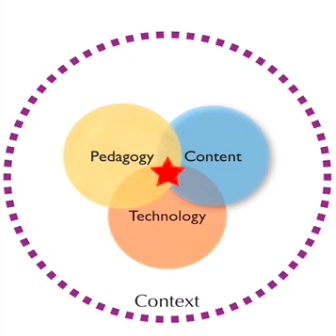
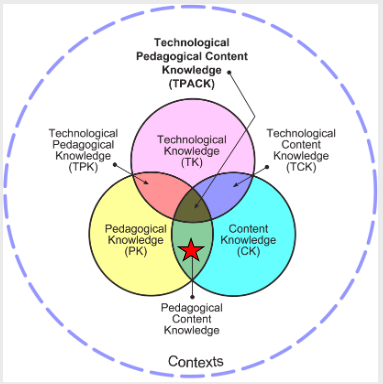
Technological Pedagogical Content Knowledge (TPACK) is indicated by the red star placed where all three bodies of knowledge intersect in the Venn Diagram. Technological, pedagogical and content knowledge need to be framed within a given context which is depicted by the dotted purple circle that encloses the Venn Diagram. Together these components represent a framework available to teachers for technology integration (Koehler & Mishra, 2009).

One of the key points Koeler and Mishra (2009) emphasise about technology integration is that there is no ‘one best way’ to integrate technology into the curriculum.

“…integration efforts should be creatively designed or structured for particular subject matter ideas in specific classroom contexts.”

Koehler & Mishra, 2009, p.62

The framework gives teachers the freedom to use their skills to integrate technology creatively within their own classroom context. What is really significant about this aspect of the framework is that it acknowledges that all teachers will have varying levels of knowledge for each framework component. So no matter what stage you are within your teaching career the framework is relevant to assist with the development of classroom technology skills.

Nearing the end of a Bachelor of Education (K-12), and the end of a classroom technologies subject, my TPACK knowledge as whole has increased somewhat in all aspects since the beginning of the degree. At the moment I would say, compared to where I want to be, that I would have strong theoretical Pedagogical content knowledge (PCK) compared to having a strong practical PCK. I have indicated this in Figure 1.

Figure 1. Level of my theoretical TPACK in general. Adapted from “What is technological pedagogical content knowledge?”, by M. J. Koehler and P. Mishra, 2009, Contemporary Issues in Technology and Teacher Education9(1), p. 63. Copyright 2016 by CITE Journal.

Throughout the classroom technologies subject, I have realised that I need to increase my technological knowledge (TK) to increase my TPACK as a whole. It is also important, however, to keep in mind the level of knowledge in all three components depends on a specific context. The context I am referring to is my knowledge of TPACK in general. As I progress in my career the development of my classroom technology skills for certain contexts, and as a whole, will increase both theoretically and practically with experience.

The TPACK framework is also referred to as “Tech-PACK” and used by Roblyer and Doering (2014) within the technology integration planning (TIP) model. The TIP model aims to ensure that technology use is meaningful, efficient, and successful in meeting needs of students through three phases. Roblyer and Doering (2014) incorporates TPACK as a component of the first phase where teachers assess their knowledge within each component for a specific context which is demonstrate in a number of case studies. The case studies are a really useful demonstration of how TPACK can be used to assist teachers’ develop classroom technology skills.

References

Kohler, M. (2013, September 12). Mishra & Koehler (2008) – Site 2008 Keynote Address [screenshot]. Retrieved from https://www.youtube.com/watch?v=1iCPLTz7Z-Q

Koehler, M. J., & Mishra, P. (2009). What is technological pedagogical content knowledge? Contemporary Issues in Technology and Teacher Education9(1). Retrieved from https://www.citejournal.org/volume-9/issue-1-09/general/what-is-technological-pedagogicalcontent-knowledge

Roblyer, M., & Doering, A. (2014). Integrating educational technology into teaching. Harlow, England: Pearson.

Ethical Issues

Further investigation into safety and privacy issues for students

Among the issues raised by Roblyer and Doering (2014) about the safety and privacy issues for students, I’ll be focusing on Cyberbullying.

Image result for cyberbullying
https://schoolsthatrock.co.za/how-to-keep-your-child-save-cyberbullying/

Cyberbullying, also known as Online Bullying, can produce harmful consequences for young people. Campbell, Whiteford, Duncanson, Spears, Butler, and Slee (2017) suggests that cyber-bullying has negative social and emotional effects on both the victims and perpetrators.

An explanation outlining the types of online bullying behaviours can be found on the Bullying. No Way! website. The term is also explained in a series of four short animations which introduces the national definition of bullying for Australian schools.

The Bullying. No Way! website is equipped with a number resources for educators, school leaders, teens, kids, parents and carers, for community. There are pages that answer FAQs and a page with revealing facts and figures about bulling and online bullying.

“Online bullying appears to be related to age (or access to technology), with secondary students more likely to engage in bullying online than primary school students.”

Bullying. No Way!, 2019

Campbell et al. (2017) also define the context of cyberbullying as one that unfolds with a large network of bystanders. Their research examines gender and age of cyber-bullying bystanders of 2109 upper primary and secondary school students in Australia. Findings suggests that bystanders to cyberbullying were most likely not to do anything or help the person cyberbullied.

I looked into Cyberbulling because it is a topic that is relevant for a number of year levels I will teach as my degree is K-12. The best resource I found was The Bullying. No Way! website mentioned above as it has links to other valuable sites, insightful resources and is easy to navigate. I strongly recommend taking some time to have a look.

References

Bullying. No Way! (2019). Retrieved from
https://bullyingnoway.gov.au/

Campbell, M. A., Whiteford, C., Duncanson, K., Spears, B., Butler, D., & Slee, P. T. ( 2017). Cyberbullying bystanders: gender, grade, and actions among Primary and Secondary Schol Students in Australia. International Journal of Technoethics, 8(1), 44-55. Retrieved from
https://www-igi-global-com.ezproxy.csu.edu.au/gateway/article/178532

Roblyer, M., & Doering, A. (2014). Integrating educational technology into teaching. Harlow, England: Pearson

Google Education

A few useful teaching resources

While exploring google education teaching resources I found many that are interesting, engaging and useful. Below, are links to a couple of my favorites that can be used across a range of year levels and subjects. I will provide a brief description of how I imagine myself using them.

Image result for google education

Science Journal App: This is an App compatible with multiple platforms and comes with over 70 hands-on science activities.

The functions would predominantly be suitable for science and mathematics as it encourages students to record observations, take photos and collect data for experiments.

I would integrate Science Journal into science lessons for primary students using the Primary Connections 5Es teaching and learning model (Australian Academy of Science, 2019). The model involves an inquiry-orientated style of teaching and students are actively engaged with learning. Students would use the App to record relevant information for different experiments that relate to the content in the NSW Education Standards Authority (2017) Science and Technology K-6 Syllabus.

Trimble SketchUp: is 3D design software that has a 30 free trial and is suitable for both Mac and Windows.

The software would be really useful for a range of subjects. In an upper primary context I would use the the software for Mathematics, Science and Art. The content on 3D shapes for upper primary (Stage 3) in the Board of Studies New South Wales (2012) Mathematics K-10 Syllabus, would be a great place to integrate this software.

100 000 Stars: is a really engaging and interactive visual tool for students to explore the stellar neighbourhood. It is created for the Google Chrome web browser. Simply use you computer mouse to zoom in/out to explore different stars.

This tool could be used across a number of grades K-12 in the Science Key learning Area (KLA). I would integrate this tool in an upper primary science classroom when covering the topics within the Earth and Space element of the NSW Education Standards Authority (2017) Science and Technology K-6 Syllabus.

References

Australian Academy of Science. (2019). 5Es Teaching and Learning Model. In Primary Connections. Linking science with literacy. Retrieved from https://primaryconnections.org.au/node/262

NSW Education Standards Authority. (2017). Science and Technology K-6 Syllabus. Retrieved from https://educationstandards.nsw.edu.au/wps/wcm/connect/5ab69646-f1d4-404b-9c16-b39dfb0986d3/science-and-technology-k-6-syllabus-2017.pdf?MOD=AJPERES&CVID

Board of Studies New South Wales. (2012). Mathematics K-10 Syllabus. Retrieved from: https://educationstandards.nsw.edu.au/wps/portal/nesa/k-10/learning-areas/mathematics/mathematics-k-10

Web 2.0 tools

How can you use them in teaching?

Figure 1: Web 2.0 tools. From “Discovery Education” by J. Conroy, 2016, https://blog.discoveryeducation.com. Copyright 2016 by Justine Conroy.

Bower (2016) presents outcomes of a topological analysis of Web 2.0 technologies and findings that suggest educators typically have a narrow conception of the developing Web 2.0 learning technology landscape. The article also acknowledges that continual change in the Web 2.0 landscape provides a challenge for teachers and educational researchers to translate effective use of these technologies into the classroom. Hew and Cheung (2012) suggest that it’s not the technology alone that determines positive learning effects on students it is the way in which they are used; a focus must also be placed on teacher’s beliefs and values towards technologies (Blannin, 2015).

With this in mind, I would like to describe ways I could use Web 2.0 tools in the classroom. To encourage reflective thinking I would use tools most effective for online reflections such as weblogs. One of the benefits of blogging is that it enables students to view the progress made in how their thinking transforms over the course of a unit of learning (Hew & Cheung, 2012). Bower (2016) suggests that Web 2.0 technologies afford substantial opportunities to enhance communication which leads to the second use for these tools- online collaboration. This use allows students to exchange ideas, share multiple perspectives, establish connectivity and clarify understandings (Bower, 2016; Hew & Cheung, 2012). Web 2.0 tools can also be used by students to create content, exercise new modes of inquiry and develop digital literacies (Bower, 2016). Tools such as 3-D immersive virtual worlds and those with a repository functionalities such as YouTube may provide these opportunities for students.

There are many technologies available that are suitable for teaching and learning. The examples given above for the uses of Web 2.0 technologies are just a few of the many described in the research provided by Bower (2016) and Hew and Cheung (2012).

References

Blannin, J. (2015). The role of the teacher in primary school web 2.0 use. Contemporary Educational Technology, 6(3), 188-205. Retrieved from:
http://web.a.ebscohost.com.ezproxy.csu.edu.au

Bower, M. (2016). Deriving a typology of Web 2.0 learning technologies. British Journal of Educational Technology, 47(4), 763-777. Doi: doi:10.1111/bjet.12344

Hew, K. F., & Cheung, W. S. (2012). Use of web 2.0 technologies in K-12 and higher education: the search for evidence-based practice. Educational Research Review. Doi: http://dx.doi.org/10.1016/j.edurev.2012.08.001

Applying ICT to my discipline area and catering for students with special educational needs (SEN)

Using the TIP model

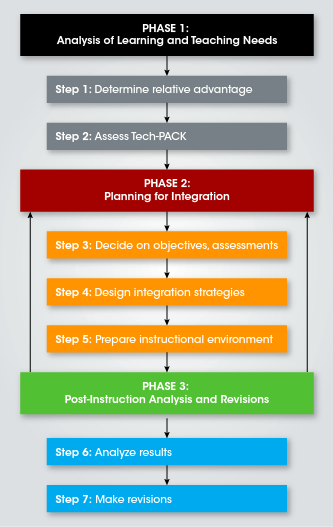
The hardware and software choices I would make in relation to the English discipline area would be selected when using the Technology Integration Planning (TIP) Model for teachers. The TIP model encompasses three broad phases that guide teacher planning and helps ensure that technology use will be meaningful, efficient, and successful in meeting needs of students (Roblyer & Doering, 2014). Figure 1 shows the steps within each of the phases.

Figure 1: The steps within the three phases of the TIP model(p. 67), by M. D. Roblyer & A. H. Doering, 2014, Harlow, England: Person. Copyright Year by “Pearson Education Limited 2014”.

The first phase involves analysis of learning and teaching needs (Roblyer & Doering, 2014). Within this phase, I would reflect on my skills in each of the TPACK areas to evaluate where I need support and how I might use my strengths. For example, I might be lacking in pedagogical knowledge (PK) to teach students with special educational needs. Before going any further in the planning phases, I might seek advice from a more experienced colleague or appropriate paraprofessional.

The next phase requires planning for integration (Roblyer & Doering, 2014). In this phase, the teacher decides on objectives and assessments that involves the integration of suitable technology . King-Sears, Swanson, & Mainzer (2011) and Seo & Woo (2010) advocate that when the curriculum is made accessible through technology, students with disabilities have the same opportunities to learn as their peers with out disabilities ( as cited by Roblyer & Doering, 2014).

Lastly, the third phase involves analyses of results and an opportunity to make improvements for next time. Successful technology implementation may lead to the project or lessons to be used as a resource for other teachers with similar needs in their classrooms.

References

Roblyer, M., & Doering, A. (2014). Integrating educational technology into teaching. Harlow, England: Pearson.

Social Activism Theory


‘The Grandfather of Constructivism’

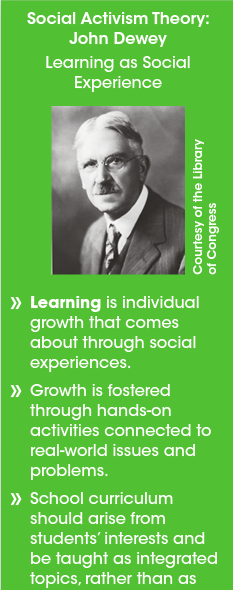
Figure 1. Social Activism Theory underlying Inquiry-based technology integration strategies. Adapted [reprinted] from Integrating educational technology into teaching (p. 56), by M. D. Roblyer & A. H. Doering, 2014, Harlow, England: Person. Copyright Year by “Pearson Education Limited 2014”.

The image to the right provides an outline of John Dewey’s Social Activism Theory, a constructivist learning theory that underpins inquiry-based technology integration strategies.

Dewey’s theory advocates that learning involves social interaction among students, working together on authentic, real-world tasks of direct concern to them. For teachers, the educational implication includes practicing pedagogies that stress collaborative learning with activities that encourage student interaction with real-world problems and issues (Roblyer & Doering, 2014). To enhance these practices, technology can integrated to provide opportunities for collaboration and help student connect abstract concepts with real-world applications.

I believe social activism theory and the associated technology integration are essential components of effective lessons. The theory provides the aims for the desired purpose of the technology; a learning tool that enhances both the engagement and ICT capacities of students.

References

Roblyer, M., & Doering, A. (2014). Integrating educational technology into teaching. Harlow, England: Pearson.

Zoho Show

Exploring the features that define Zoho Show, setting it aside from PowerPoint as a presentation tool.

I began researching for some new software beyond the traditional and more well known software tools such as Word, PowerPoint & Excel…and I found a presentation tool known as Zoho Show.

There are many features that set this tool apart from PowerPoint as well as sharing some commonalities. The video below will give you a bit of insight into the potential of the tool. Keep in mind that this video was made in 2012 and there have been many updates since.

The video presents key features of Zoho Show: Design elements, collaboration & broadcasting

Since 2012 when the video was uploaded to YouTube, there have been many new features that have been introduced which can be found by clicking here.

Now, getting back to the main features and the potential for use in our classrooms. From reading the website and navigating this platform there are number of highlights that Zoho Show presents to users. There is a free version as well as a paid version, similar to many other creative platforms such as Weebly and Wix. The free version is where I base my experience from.

Create & Design

The tools need to craft each slide are easily accessible, displayed in top-centre of the screen.

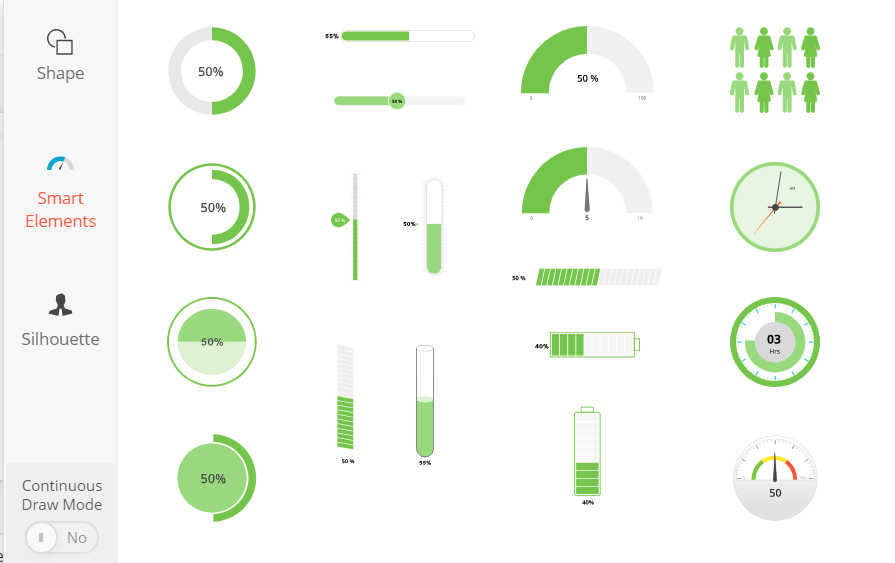
Each tool has a visual drop menu that offers a range of smart and innovative features

iThe ‘Media’ tool allows the user to embed visual material from YouTube, Twitter Feed & video/audio from support external websites.

An example of the drop down menu for ‘Shape’ showing the ‘smart elements’ which are all interactive.

I find the layout less confusing, more accessible and more impressive than PowerPoint. If students want to convert their PowerPoint to Zoho Show, students can do so without any format issues.

Collaborate & Broadcast

I like that Zoho Show can be downloaded and used on a number of portable devices such as iPhone, iPad, and Apple/Android TV. Students can share and collaborate on slides, similar to Google Docs, which would be useful to incorporate into cooperative learning.

Drop down menu from ‘File’

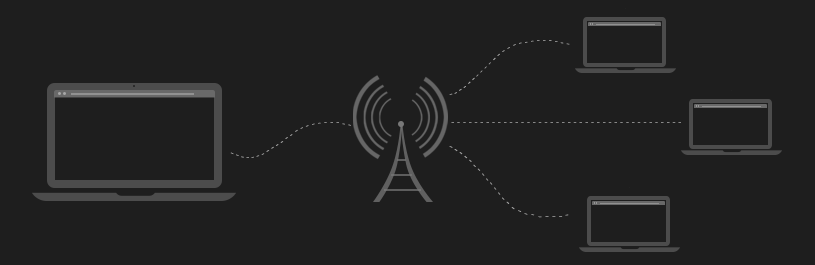
By clicking on ‘File’ the presentations can be broadcast and shared to authentic audiences. The link can be shared to social media, the presentation itself can be embedded into a website or blog and can be broadcast to a live audience.

Your audience will only see the slides being presented and can be invited to your broadcast by entering their email address into the ‘Invite Participants’ section (Max. 25 invitees).

During a live broadcast, an app called Chromecast allows you to use a mobile device, such as a mobile phone, as a remote so you can highlight key points to your audience.

Above are just a few of the highlights of this software that has so much potential in our classrooms. I really like the collaboration and broadcast feature that allows for for teacher-student collaboration as well as student to student and students to broader audience. The design features are an additional highlight to Zoho Show as a presentation tool.

For more features click here, this will take you to their website.

ICT: an essential learning tool and educational goal

ICT is an essential tool in our profession for both teaching and learning (Voogt et al, 2011; Comi et al, 2017) Nevertheless, the emphasis should remain on quality pedagogy to incorporate technology, not the technology itself. Voogt (2010) and Tondeaur et al (2008) suggest that frequent use of ICT and a 21st century pedagogical underpinning are positively related (as cited in Voogt et al, 2011).

“It is without question that ICT has a primary place in 21st century skills and 21st century learning, the acquisitions of ICT skills is therefore not only an education goal, but ICT also serves as tool to support teaching and learning.”

Voogt et al, 2011, p.2

Teachers should be encouraged to be innovative and creative, re-purposing technology in ways that are student-centred and are engaging for 21st century learners. Koehler & Mishra (2005, 2008) elaborate on the TPACK framework which underpins this idea of combining pedagogy and ICT (as cited in Voogt et al, 2011). Studies show that many teachers possess basic ICT skills, however, lack competencies related to the pedagogical use of ICT (Christensen & Knezek, 2008). The TPACK framework is a way to help teachers equip themselves with the skills to develop students’ ICT competencies.

A number of researchers, however, suggest TPACK is not enough to enhance the integration of ICT into educational practices, teachers beliefs and attitudes are a key component to be considered. Research by Niederhauder & Stoddart (2001), Ertmer (2005) and Tondeur et al (2008) show a relationship between teachers’ beliefs and their use of technology in the classroom (as cited by Voogt et al, 2011). Christensen & Knezek (2008) found that when ICT is used creatively by teachers, their attitude towards ICT is positive. Evidently, there is a clear connection between teachers attitudes and integration of ICT as an educational tool, and that developing teacher pedagogy should be of focus.

Voogt et al (2011) suggest that not only is ICT an essential education tool to support teaching and learning, the acquisition of ICT skills is an educational goal. The study by Smith, Skrbis & Western (2013) finds that students need to develop their competency in ICT literacy, these skills are not something they inherently possess as assumed by the ‘Digital Native rhetoric’. There are a number articles that assert criticisms against the notion of ‘digital natives’ advocating for the need to develop student ICT capabilities (Bennett, Maton & Kevin, 2008; Kennedy, Judd, Dalgarno & Waycoot, 2010; Smith, Skrbis & Western, 2013).

“…a key lesson is that young people do not speak the digital language until, like the preceding generation, they learn how to do so.”

(Smith, Skrbis & Western, 2013, p. 115)

Technology is an essential learning tool and an important education goal to foster in our classrooms, however, teachers are at the forefront of the matter. Frameworks such as TPACK that promote creative and innovative uses of technology along side research-based pedagogy, to support 21st century learning, are our way forward.

References

Bennett, S., Maton, K., & Kervin, L. (2008). The ‘digital natives’ debate: A critical review of the evidence. British Journal of Educational Technology, 39(5), 775-786.

Christensen R. & Knezek G. (2008) Self-report measures and findings for information technology attitudes and competencies. In International Handbook of Information Technology in Primary and Secondary Education (eds J. Voogt & G. Knezek), 397-417. Springer, New York, NY

Comi, S. L., Argentin, G., Gui, M., Origo, F., & Pagani, L. (2017). Is it the way they use it? Teachers, ICT and student achievement. Economics of Education Review(56)24-39. Retrieved from: https://www-sciencedirect-com.ezproxy.csu.edu.au/science/article/pii/S0272775715302776

Kennedy, G., Judd, T., Dalgarno, B., & Waycott, J. (2010). Beyond natives and immigrants: exploring types of net generation students. Journal of Computer Assisted Learning, 26(5), 332-343.

Smith, J., Skrbis, Z., & Western, M. (2013). Beneath the ‘Digital Native’ myth Understanding young Australians’ online time use. Journal of Sociology, 49(1), 97-118.

Voogt J., Knezek G., Cox M.J., Knezek D.& ten Brummelhuis A. (2011) Under which conditions does ICT have a positive effect on teaching and learning? A call to action. Journal of Computer Assisted Learning. Retrieved from: https://onlinelibrary-wiley-com.ezproxy.csu.edu.au/doi/pdf/10.1111/j.1365-2729.2011.00453.x

‘The Total PACKage’

Technology in education

Technology’s place in education is discussed by delegates of the 2012 Victorian Information Technology Teachers Association (VITTA) Conference in a podcast by Anthony Funnell and by Punya Mishra in his 2012 keynote speech at the 21st Century learning conference. Collectively, intellectual insights are given with consideration for both the potential and limitations of technology in the classroom.

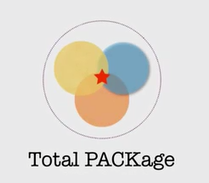
The circles of the Venn Diagram represent technology, pedagogy and content. The star represents teaching from an intersection of all three parts, not seeing them in isolation.

Punya Mishra questions techno-centrism through three key arguments that underpin his TPACK (technological pedagogical and content knowledge) framework, whereby technology, pedagogy and content must not be viewed in isolation. This framework is also known as the ‘Total PACKage’ with a focus on an integration of all aspects.

Stakeholders interviewed by Funnell coincide with the integration of all three aspects. Greg Whitby, executive director of Catholic Schools in Greater Western Sydney, advocates that a sole focus on technology ignores the nature of quality of learning and teaching. Furthermore, Game designer Shourov Bhattacharya of Pongo Labs also maintains that technology has its place and balance must be maintained.

One of the key messages presented by Mishra is the idea of redefining the purpose of technologies, using them in ways beyond their intended purpose. ‘Re-purposing’ technology resonates with the view of technology presented by Philip Callil, president of the VITTA and conference director, in the podcast. He underpins the importance of learning how to use devices in student centered ways that promote contemporary learning. I think that this can be achieved through rethinking technology which would demonstrate the integration of the Venn Diagram components.

The technologies discussed in the podcast include the potential for gaming as an educative tool in classrooms. Paul Callaghan, director of Free play Independent Games Festival in Melbourne, is heavily involved in trialing games-based learning initiatives in the classroom. He promotes teaching games literacy and promoting an appreciation in similar ways to that that of narratives or film.

“Education…it should encourage spaces where children can uncover those things that they care about and then pursue those goals rather than turning things that are less palatable into a sugar-coated pill.”

Paul Callaghan, 2012

As an English major, I find viewing video games as artifacts incredibly interesting and agree with Callaghan that not everything needs to or should be turned into a game, emphasising the balance that needs to be maintained. Moreover, Callaghan promotes that education through gaming and technologies should be more about encouraging students to pursue a multitude of possibilities. Coinciding with this point is one made by Mishra which is to encourage students to explore, create and share in authentic ways.

The views and key messages discussed by the podcast and keynote speech were incredibly insightful and relevant. The blog has only ‘scratched the surface’ of the ideas presented.

If you would like to access the podcast or keynote speech, you can find them here:

This is the keynote speech given by Punya Mishra, a prominent academic and researcher in educational technology , at the 21st Century learning Conference

Below is the link to the Podcast ‘Future Tense’ with Anthony Funnell, presenting views from a variety of delegates of the 2012 Victorian Information Technology Teachers Association (VITTA) Conference.

https://www.abc.net.au/radionational/programs/futuretense/2012-08-19/4197238

Design a site like this with WordPress.com
Get started